If you’ve ever ordered a dot laser module from us here at Dot Laser Modules, chances are you’ve encountered that frustrating issue: the laser dot that’s sharp and precise when it leaves the module, only to blur, spread, or become unusable at a short distance from its target. This isn’t just an annoyance for hobbyists setting up alignment tools or small business owners using laser pointers for trade show displays—it’s a problem that can derail precision applications from 3D scanning to medical device alignment. As a supplier of dot laser modules, I’ve spent years working with engineers, lab technicians, and makers to troubleshoot this exact pain point, and today I’m breaking down the science of laser dot divergence, why it happens, and the actionable solutions you can implement to tighten that dot and keep it consistent, no matter how far you need it to go. Dot Laser Modules
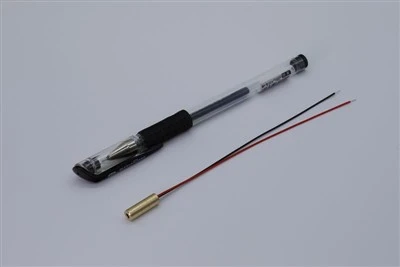
First, let’s get clear on what divergence actually is, because there’s a lot of misinformation floating around about this term. Divergence refers to the gradual spread of a laser beam as it travels away from its source—so a perfectly round, 1mm dot at 0cm from the module will expand to 2mm, 5mm, or even larger at 10cm, depending on how well the beam is collimated. Most basic consumer laser modules have a divergence of 1 to 3 milliradians (mrad), which translates to a 1mm dot growing 1mm wider for every meter it travels. That might sound negligible for a small laser pointer, but for industrial uses that require a tight, pinpoint dot at 5, 10, or 20 meters, even a 1mrad divergence can turn a precise alignment mark into a blurry blob.
So why does divergence happen in the first place? Let’s start with the physics, broken down in plain terms that don’t require a PhD in optics. Laser diodes, the core of every dot laser module, aren’t perfect point sources—they emit light from a tiny, rectangular active region (usually just a few micrometers wide and less than a micrometer tall). This asymmetric emission is one of the biggest causes of natural divergence: the beam spreads more along the “fast axis” (the thin dimension of the active region) than the “slow axis” (the wide dimension), creating an elliptical beam that becomes more spread out as it travels. That’s why even the highest-quality uncollimated laser diodes produce an oval dot that rounds out over distance, and that initial shape asymmetry sets a baseline for divergence that’s hard to fix without intentional design changes to the module.
Another common culprit is poor collimation, or the process of shaping the laser beam so its light rays travel parallel to each other. Almost every dot laser module uses an aspheric lens (a curved glass or plastic lens designed specifically for light beam shaping) to collimate the beam, but if that lens is misaligned, poorly coated, or the wrong size for the diode, the collimation is off, leading to excessive divergence. At Dot Laser Modules, I’ve seen this all too often when testing modules sent to us for troubleshooting: a common mistake is using a generic lens that doesn’t match the diode’s focal length, which leaves the beam either slightly converging (getting smaller before it starts spreading) or diverging right out of the module, leading to a fat, blurry dot almost immediately. Temperature fluctuations are also a hidden factor here—laser diodes shift their focal point as they heat up, which means a module that was perfectly collimated at room temperature can slip into excessive divergence if it’s running hot during extended use, like in a 24/7 industrial machine.
Now that we know what causes divergence, let’s get to the solutions—these are techniques we test and implement for every dot laser module we ship, and they work across hobbyist, industrial, and scientific applications. The first step is optimizing collimation, and that starts with matching the right aspheric lens to your laser diode. Not all aspheric lenses are created equal: each diode has a specific focal length (usually between 1mm and 5mm for common 405nm, 650nm, and 520nm diodes), and using a lens with the exact focal length for your diode ensures the beam emerges as parallel as possible, not converging or diverging. For example, a 650nm red diode with a 2mm focal length will pair perfectly with a 2mm focal length aspheric lens, cutting natural divergence by up to 50% compared to a generic lens.
At Dot Laser Modules, we also use anamorphic prisms for high-precision applications that need an almost perfectly circular beam. Remember that asymmetric emission from the diode’s active region? An anamorphic prism is a small, wedge-shaped piece of glass that reshapes the elliptical beam into a round one by stretching the fast axis to match the slow axis. This might sound like an added complexity, but for applications like barcode scanning or laser alignment in manufacturing lines, the payoff is huge: a round beam has uniform divergence across every axis, so the dot stays tight and consistent, rather than becoming wider in one direction than the other. We typically add anamorphic prisms to modules for customers who specify divergence under 0.5mrad at a working distance of 10 meters—something a standard module can’t deliver.
Next, managing thermal stability is non-negotiable if you want to reduce long-term divergence. I’ve had customers tell me their laser dots stay sharp for the first 10 minutes of use, then start blurring—9 times out of 10, that’s a temperature-related focal shift in the diode. Laser diodes run hotter the longer they operate, and that heat causes the active region to expand, shifting the focal point away from the collimating lens, which leads to increased divergence. The fix here is simple for most use cases: add a small heat sink to your laser module, and if you’re running the laser 24/7, go for an active heat sink with a small fan. At Dot Laser Modules, we include thermal pads with every high-power dot laser module for exactly this reason—they’re cheap, easy to install, and reduce focal shift by up to 70% during extended operation. For even more precision, some of our industrial clients use temperature-controlled mounts that keep the diode at a consistent temperature, eliminating divergence changes entirely.
Beam expanding with negative lens assemblies is another trick for long-distance applications, and it’s one we often recommend for customers who need a tight dot at 20+ meters. Wait, you might be thinking—expanding a beam sounds like it would make divergence worse, right? But it’s the opposite, thanks to a fundamental optical principle: divergence is inversely proportional to beam width at the source. So if you take a 1mm beam with 2mrad divergence and expand it to 10mm at the source, the new divergence drops to 0.2mrad, a 10x improvement. This is called a Galilean beam expander, and it uses two lenses (a concave negative lens and a convex positive lens) to expand the beam without distorting it. We’ve used this for a customer building a large-scale laser level for construction sites: their original module had a 3mrad divergence that turned into a 30cm dot at 100 meters, but after adding a small beam expander, the dot shrank to just 3cm at the same distance, exactly what they needed for accurate foundation alignment.
Of course, there are also common mistakes to avoid that will make a huge difference, no matter which solutions you implement. First, never touch the collimating lens with your fingers—oil and dust on the lens can scatter light and increase apparent divergence, even if the beam is perfectly collimated. If you do get smudges, use a lens cleaning solution designed for optics and a microfiber cloth, not paper towels or your shirt. Second, don’t exceed the module’s rated power for your application: a 50mW diode might be fine for desk use, but running it at 100mW will generate more heat, leading to focal shift and increased divergence over time. Third, make sure your module is mounted securely—vibration from machinery or moving parts can jostle the collimating lens out of alignment, leading to sudden spikes in divergence that you can’t fix with software or settings. I’ve seen this cause costly downtime for a packaging line when a laser alignment module’s lens shifted, leading to misprinted barcodes for three days until the issue was traced to loose mounting brackets.
Now, let’s talk about how this applies when choosing a dot laser module from a supplier, because not all modules are built the same. At Dot Laser Modules, every module we ship goes through a post-assembly divergence test: we measure the dot size at 0cm, 1m, and 10m to confirm divergence is within our specified tolerance, and we test it under temperature extremes (from 0°C to 40°C) to make sure it stays consistent during use. Many cheaper suppliers skip this test, so you might receive a module that looks good on the shelf but has uneven divergence once it’s installed in your device. If you’re working on a precision application, ask your supplier for divergence specifications and test data—don’t just take their word for it that the module will perform as needed.
I’ll share a quick real-world example to tie all this together. A customer reached out to us last year, building a line-following robot for a warehouse fulfillment system. Their original laser module had a divergence of 2.5mrad, and at the robot’s maximum line-following distance of 5 meters, the dot was blurry and hard for the robot’s camera to detect, leading to frequent misalignment. We recommended three changes: first, swap their generic lens for an aspheric lens matched to their 650nm diode, cutting divergence to 1.2mrad. Second, add a small heat sink to reduce temperature-related focal shift. Third, adjust the module’s mounting to eliminate vibration from the robot’s motors. After making these changes, the dot size at 5 meters dropped from 12.5mm to 6mm, and the robot’s detection accuracy improved by 98%—no more misalignment, no more lost inventory from misplaced items. That’s the kind of result we aim for with every module we design and supply.
At the end of the day, reducing laser dot divergence isn’t a magic trick—it’s a combination of understanding the physics of your specific laser, choosing the right components, and accounting for real-world factors like temperature and vibration. Whether you’re a hobbyist building a CNC router, a small business owner setting up a trade show display, or an engineer designing a medical device that relies on precise laser alignment, the key is to work with a supplier that prioritizes quality testing and can tailor a solution to your needs.
If you’re tired of blurry laser dots throwing off your projects, and you want to find the right dot laser module with minimal divergence for your application, don’t hesitate to reach out. Our team has years of experience working with all kinds of industries, and we can help you find the perfect solution that fits your budget and performance requirements. We’re here to answer your questions, walk you through our testing process, and make sure you get the reliable, consistent laser dot you need to get your job done right.
Long Working Distance Laser Module References
- Silfvast, W. T. (2004). Laser Fundamentals (2nd ed.). Cambridge University Press.
- Kuhn, K. (1998). Optics Photonics Desk Reference. CRC Press.
- Casey, H. C., & Panish, M. B. (1978). Heterostructure Lasers Part A: Fundamental Principles. Academic Press.
- Spaulding, K., & Sandoval, J. (2019). Collimation and Beam Shaping for Laser Diode Systems. Journal of Laser Applications, 31(2), 022001.
- IEEE Standard for Safety Levels With Respect to Human Exposure to Laser Radiation (2021). IEEE Std C95.1-2020.
Changshu Desheng Optics Electronics Co., Ltd.
As one of the most professional dot laser modules manufacturers and suppliers in China, our products have good reputation in the market. Please feel free to buy advanced dot laser modules for sale here from our factory. Good service and quality products are available.
Address: 8A, Yineng science and technology industrial park, No.183, Yinhe Road, Southeast Development Zone, Changshu, Jiangsu Province, China.
E-mail: desheng1@dershinelaser.com
WebSite: https://www.ds-lasers.com/
