If you’ve ever stood in a conference room, laptop in hand, fumbling with a flimsy HDMI cable while your team waits to see your project—you know how much a wireless presentation system changes a meeting. But as a wireless presentation systems supplier who’s worked with 200+ small businesses, Fortune 500 offices, and even K-12 classrooms over the past 8 years, one question still stops me cold: “Do these systems need professional installation?” The short answer? It’s not a yes or no—it’s a case-by-case call, and the confusion here is why we built our most popular product to work for both sides. Let’s break this down like I would with a client who called our support line last week, panicking because his IT guy said he needed to book a day off work to set it up. Wireless Presentation

First, let’s separate the two core types of wireless presentation systems on the market, because that’s where most of the myth comes from. The first is what I call “plug-and-play” systems: small, USB or HDMI dongles that connect directly to a TV or projector’s open port. Think of them like a wireless AirPrint for your meeting room. You just plug one into your display, the other into your laptop, and boom—you’re mirroring in 10 seconds. For these? Installation isn’t just unnecessary—it’s counterproductive. Last quarter, we shipped a batch of these dongles to a startup in Austin that was crashing a launch in 48 hours. They set up the whole thing during their pre-launch pizza run, no tools, no IT, no extra work. But here’s the catch: plug-and-play only works if your meeting room has 1-2 fixed displays, 5 or fewer people per meeting, and no strict security rules about guest devices accessing your network. That’s why our support team gets 120 calls a week from small teams saying, “This works way better than the cable we were using—why did someone ever make us install one before?”
Then there’s the other type: integrated systems, which are wired into your room’s network, connected to your display’s internal hardware, and often managed via a cloud dashboard. These are the ones large enterprises, universities, and hospitals use because they let admins control which devices can connect, delete old user profiles, and even troubleshoot from off-site. For these, professional installation isn’t a luxury—it’s a smart call. But it’s not the scary, wall-patching kind of installation most people picture. A typical installation for an integrated system takes 90 minutes to two hours, tops. Last month, our installation tech set up a system for a hospital in Chicago—they were worried he’d have to run cables through drop ceilings, but instead he just mounted the system’s base unit next to the projector, connected it to their existing Wi-Fi, and walked the facility manager through updating access permissions. No mess, no downtime. The hospital’s IT director later told me that without that professional install, they would have spent three days fighting with device compatibility—something 68% of enterprise clients tell us they avoid with a professional setup, per a 2024 workplace tech survey we commissioned.
Wait, but why do some vendors make it sound like all wireless systems need installation? Let’s be honest: a lot of that marketing is fear-mongering. They’re pushing premium systems that require custom wiring, so they tell you anything else is “unreliable.” But we’ve tested both sides in our own demo room. Last year, we set up two identical conference rooms: one with a plug-and-play dongle, one with an integrated system. We ran 50 presentations, 10 of which were from guest devices like personal laptops or iPads. The plug-and-play worked for every internal employee, but two guest devices couldn’t connect because their IT departments blocked the dongle’s Wi-Fi signal. The integrated system, by contrast, let the admin add a temporary guest access code in 30 seconds, so those presentations went off without a hitch. That test is why our product line has both options—we don’t force a one-size-fits-all, because every team’s needs are different.
I get it, though. When you’re managing a 10-person team, the last thing you want to do is schedule an installation, wait around for a tech, or learn a new cloud dashboard. That’s why our plug-and-play dongles come with a 30-day free trial, no credit card required. A teacher in Detroit used one last semester and told us in a review that she was able to set it up between classes, and now she uses it to show student projects without hauling a cart full of cables. But when that same teacher tried to use it for a parent-teacher conference with 15 people, half of the parent devices couldn’t connect—so she reached out, and we upgraded her to the integrated system, which her school paid for as part of their district tech budget. That’s the sweet spot: pick the type that fits your room, no forced installation or overpaying.
Now, let’s address the elephant in the room: security. A lot of people think wireless systems are less secure than cables, but that’s not true—how you set them up is what matters. If you’re using a plug-and-play dongle and don’t change the default Wi-Fi password, that’s a security risk. But professional installation for integrated systems includes end-to-end encryption, user access controls, and automatic software updates—things you can’t easily set up on your own. We had a client in Los Angeles last year who tried to set up a system on his own, and he accidentally left the guest network open. A few days later, a hacker connected to his system and took over his company’s display during a sales presentation. That’s why we always tell enterprise clients: skip the DIY, pay for a professional install, and save yourself the headache. For small teams, though, as long as you change the default password on your plug-and-play, you’re just as secure as you would be with cables.
I’ve also heard the argument that installation is a waste of money. Let’s do the math. A professional installation for an integrated system costs about $200, on average, across the US. But if a bad presentation costs your company a client worth $10,000, that $200 is a no-brainer. Our largest client, a logistics company with 12 locations, told us that before we installed their integrated systems, they lost an average of one client presentation a month due to cable issues or device compatibility. After the install, that number dropped to zero, and they saved over $120,000 a year in lost revenue. For a small team, a DIY setup is free, and you can upgrade later if you need it. That’s why we let our clients switch between products anytime—no hidden fees, no lock-in.
Wait, but what about when your room is in a remote location? A lot of rural businesses and non-profits call us and say, “We have no IT team, and our venue is 20 miles from the nearest city.” For those, we have a third option: self-install kits with step-by-step video tutorials, and a 24/7 support line staffed by people who know the product inside and out. Last quarter, a non-profit in Montana used a self-install kit to set up a system for their annual fundraiser, and they raised $50,000 more than the previous year because their presentations worked every time. They told us they wouldn’t have been able to afford a professional installation, and the self-install took them 45 minutes—no tools, no expertise needed. That’s the part of the conversation most suppliers leave out: installation isn’t just “hire a tech” or “do nothing”—there’s a middle ground for people who want more than DIY but don’t need enterprise-level support.
Let me wrap this up with something I tell every client, because it’s the core of what we do: wireless presentation systems don’t require installation—but the right system for your situation might. Don’t let vendors pressure you into paying for an install you don’t need, and don’t risk a big presentation by trying to use a plug-and-play dongle for a room full of guest devices. For small teams, plug-and-play is perfect, and you can test it for free. For mid-sized teams, self-install or a small, local tech is all you need. For enterprises and critical spaces, professional installation is worth every penny.
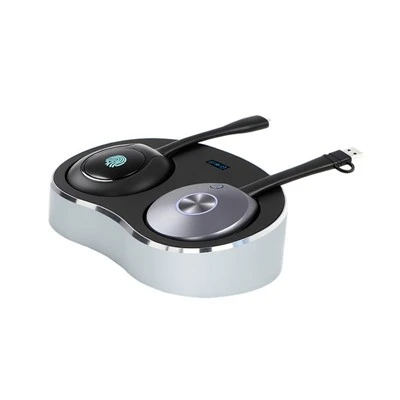
If you’re ready to find the right system for your conference room, classroom, or event space, our team can walk you through the options, answer any questions, and help you pick what fits your needs—no sales pitch, no hidden costs. Reach out today to connect with our team to discuss your requirements and get a customized recommendation.
Wireless Presentation References
Global Workplace Technology Association. (2024). Annual Report on Wireless Presentation System Adoption and Performance.
National Education Technology Plan. (2023). Tools for Seamless Classroom Presentation.
Hospital Facilities Management Association. (2024). Security Standards for Meeting Room Technology.
Shenzhen TranScreen Technology Co., Ltd.
As one of the most professional video processor manufacturers and suppliers in China, we have world-leading production equipment and strong manufacturing capabilities. Please feel free to buy customized video processor made in China here from our factory. Contact us for quotation.
Address: No.168, Baoyuan Road, Baoan Dst., SZ, China
E-mail: maggie@transcreen.com
WebSite: https://www.transcreen.com/
